
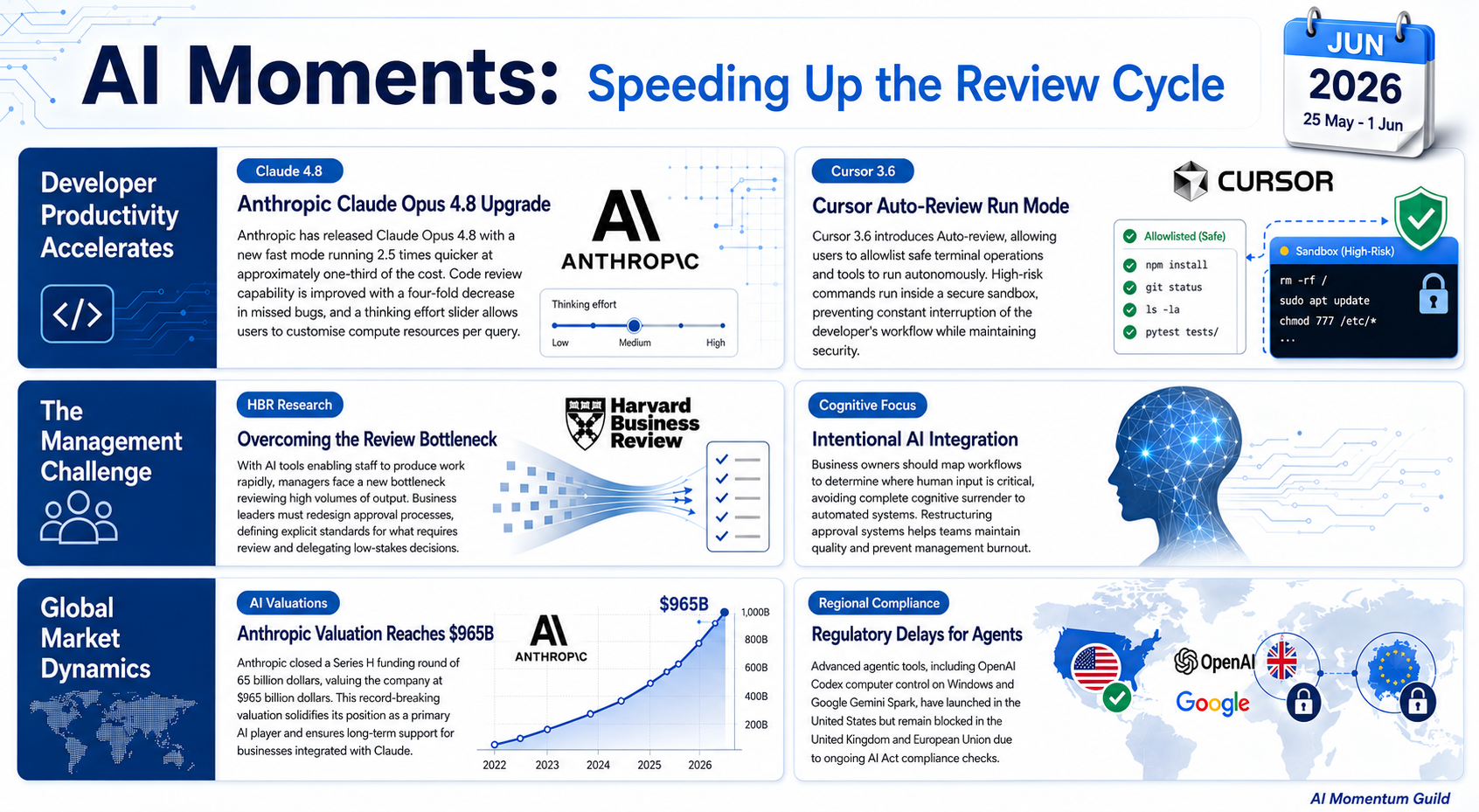
Research Period: 25 May 2026 to 1 June 2026
This week tells a single story in three parts. Two of the tools you already use, Claude and Cursor, just got faster and more autonomous. The third item, from Harvard Business Review, explains the catch: when AI lets your team produce more, faster, your job as the person who checks the work quietly becomes the bottleneck. The tools speed up the doing; your management process has to speed up the reviewing. Here is how to keep both moving together.
1. Claude Opus 4.8 lands with a faster, cheaper mode and better code-checking
What changed
Anthropic released Claude Opus 4.8 on 28 May, and it is already live for everyone on a Claude Pro or Max plan. Standard pricing is unchanged from Opus 4.7, but a new fast mode runs 2.5 times quicker at roughly a third of the cost. The model is also four times less likely to miss flaws when reviewing written code, and it adds an effort control slider so you can dial how much thinking it puts into a given answer.
Why it matters
You get a meaningfully more reliable assistant with no action required: the upgrade happens automatically next time you open Claude. The fast mode makes high-volume work, like drafting dozens of product descriptions or processing a batch of customer emails, noticeably cheaper. The effort slider lets you spend more compute on the analysis that matters and save it on the routine.
How to use it
- Switch on fast mode when bulk-drafting routine content where speed matters more than depth.
- Push the effort slider up for tricky analysis, pricing decisions, or sensitive client correspondence that needs care.
- Lean on the sharper code review when checking spreadsheet formulas, automation scripts, or website snippets.
- Run longer agentic tasks more economically now the fast tier costs roughly a third of standard.
- Claude Code users: explore the dynamic workflows research preview for large multi-step jobs.
Source: Anthropic | TechCrunch
2. Cursor 3.6 lets coding agents run longer without constant interruptions
What changed
Cursor released version 3.6 on 29 May with a new Auto-review run mode. When an AI agent works through a long task, it normally stops to ask permission before each shell command, file fetch, or tool call. Auto-review lets you allowlist the operations you trust so they run straight away, whilst anything riskier executes safely inside a sandbox. You stay in control of what needs approval, but you are no longer chained to the keyboard tapping “yes” every few seconds.
Why it matters
This removes a real friction point for anyone using Cursor for development or automation. Long agent runs used to require you to babysit them; now you can set sensible boundaries once and let the work flow. Note this is different from the Cursor 3.5 Automations we covered last fortnight: that was about scheduled agents running without you present. Auto-review is about agents running more smoothly when you are present.
How to use it
- Update to Cursor 3.6 in app settings, then enable Auto-review under Settings, Agent.
- Allowlist your routine, safe operations so trusted commands run without a prompt each time.
- Let riskier or unfamiliar operations stay sandboxed so nothing destructive runs unchecked.
- Tune the classifier instructions to match your own comfort level with autonomous execution.
- Use it for longer migration or refactoring jobs where constant approvals previously broke your flow.
Source: Cursor Changelog
3. HBR names the new management bottleneck: too much AI output to review
What changed
A Harvard Business Review article by Mollie West Duffy, published 25 May, puts a name to something many SME owners are already feeling. As AI tools let staff produce in 30 minutes what used to take a day, the manager who reviews that work becomes the choke point. One manager in the piece sums it up: “Every 30 minutes, someone creates something I have to look at.” The prescription is not more AI: it is a redesigned review process. Decide what genuinely needs approval, build clear delegation frameworks, and set output standards your team can hit without you checking every line.
Why it matters
This is the management counterpart to the two tools above. Opus 4.8 and Cursor 3.6 both increase how much your team can produce. If your approval process stays the same, you simply move the queue from “waiting to be made” to “waiting to be checked by you”. The fix costs nothing and needs no new tool: just one honest conversation about what you actually need to see.
How to use it
- Map your current approval points: list which AI outputs genuinely need your eyes and which do not.
- Write a one-page output standard defining what “good enough to use without review” looks like per task type.
- Designate one low-stakes task type as auto-approved for a week, then measure whether quality held.
- Build a simple escalation rule so staff know when to bring something to you versus proceed.
- Review the bottleneck monthly as your team’s AI output grows, rather than fixing it once and forgetting.
Source: Harvard Business Review
Additional Noteworthy
Anthropic raises $65B at a $965B valuation: Announced the same day as Opus 4.8, the Series H makes Anthropic the world’s most valuable private AI company. Reassuring backing if Claude is central to your work. | Anthropic
OpenAI Codex gains computer control on Windows: Codex can now see, click, and type inside Windows apps, but it is not available in the UK, EEA, or Switzerland at launch. One to watch for regulatory clearance. | OpenAI
Google Gemini Spark launches in the US: A personal AI agent for multi-app tasks, live for US Google AI Ultra subscribers but blocked in the UK and EU pending AI Act compliance until Q3 2026 at the earliest. | 9to5Google
AI for emotional support is a quiet risk: HBR reports employees increasingly turning to AI chatbots for emotional support and career advice. For close-knit SME teams, that can erode trust and human connection, worth keeping an eye on. | Harvard Business Review
Ethan Mollick on “cognitive surrender”: Mollick argues for deliberately choosing which thinking to keep human rather than defaulting AI for everything. A useful lens for deciding where AI genuinely helps and where it dulls your edge. | One Useful Thing
Looking Ahead
The clear theme this week is acceleration with a catch: as AI makes output cheaper and faster, the human work shifts from making to reviewing and deciding. Two threads worth watching are the regulatory gap keeping agentic tools like Codex and Gemini Spark out of UK and EU hands, and the growing conversation, from both HBR and Mollick, about being intentional rather than reflexive in how we hand work to AI.
This briefing focuses on AI developments relevant to SME operations. We pick three items each week that you can actually use, with a handful of others worth knowing about. Reply with anything you’d like covered next week.